Clicker(Official MU Helper)
The Official MU Helper system is fully integrated into the game client and does not require any additional software
or resources. The key icon represents the clicker settings. The Play button is used to start the clicker.
The settings can also be accessed by pressing Z, and the clicker can be started or stopped by pressing the Home key or clicking the mouse wheel.

Features
Assistance for both long and short distances. Potions, buffs, item pickup, skills.
Ability to configure various combinations and abilities, and much more.
Features of the MU Online Helper Clicker
The Helper can be used by any MU Online player starting from level 1. Every five minutes of using the clicker,
ZEN is automatically deducted from the player’s account.
Settings
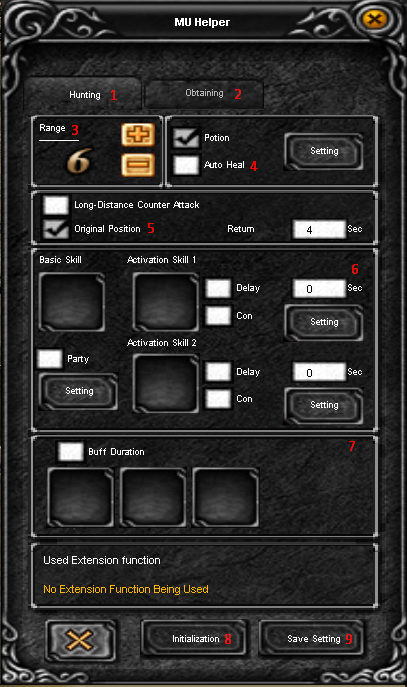
The clicker has two tabs labeled Hunting (1) and Obtaining (2).
Hunting
- 3Attack range selection.
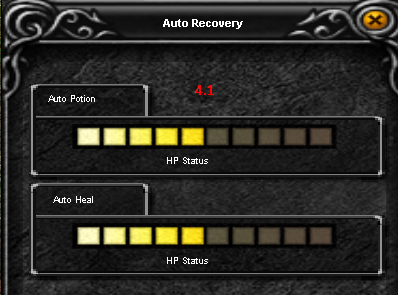
- 4Automatic use of Healing Potion. Enable the checkbox to activate the function. By pressing the Setting button, you can also set the desired HP value at which the potion will be used. The lighter the bar, the lower the minimum HP required to use the Healing Potion, and vice versa (see image 4.1).
- 5Long Distance Count — enables long-range counterattack mode (Original Position — returns to the initial position. If enabled, the character will return to the original position after collecting loot if enough time has passed; with return set to 0, the character does not move).
- 6You can set either one combat skill in the Basic Skill field or two combat skills in the Activation Skill 1 and Activation Skill 2 fields. When using two skills, you can also set a delay between their usage. Enable Delay and enter the desired time (in seconds) before switching to the second skill. If you want to enable auto-attack when monsters attack you, check Con and press Setting, then configure the required options. Repeat the same for the second skill.
- 7Auto-buff mode. Select the desired buff and it will be automatically reapplied.
- 8Reset settings.
- 9Save settings.
Obtaining
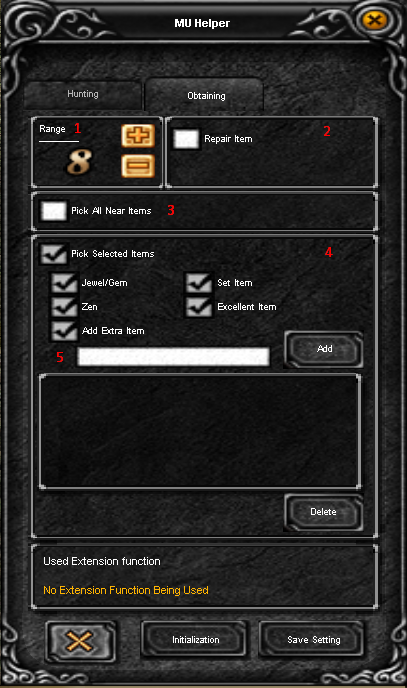
- 1Pickup range selection.
- 2Automatic equipment repair.
- 3Pick up all nearby items.
- 4Pick up specific items.
- 5Add your own item to the list.
In our example, the character will pick up stones, Excellent items, Heart of Love, and Broken Sword.
Discord
Now Online:
112
Market Items
Last items added on market x20 Legendary

|
Excellent Pad Gloves
|
6 Bon |

|
Excellent Leather Pants
|
6 Bon |

|
Excellent Socket Pearl Boots
|
1044 Bon |

|
Bundle of Jewel of Soul
|
24 Bon |
|
|
Bundle of Jewel of Soul
|
24 Bon |